
BLIK Recurring is built on BLIK’s recurring payment scheme.
During the first BLIK payment, the customer grants a mandate by confirming both the initial charge and the recurring agreement in their banking app.
All subsequent charges are processed automatically by the bank as Merchant Initiated Transactions, without requiring the customer to enter a BLIK code or take any action.
Payment type Online
Payment flow Direct
Integration type API Reference
Countries Poland (PL)
Currencies Polish Zloty (PLN)
Min amount 0.01 PLN
Max amount
2,000.00 PLN/transaction
per recurring charge
Recurring Yes
Refund Yes
Partial refunds Yes
Multiple partial refunds Yes
Chargeback No
Bank disputes are supported.Principle of operation
Recurring setup- Selection at checkout
Customer selects BLIK as the payment method and agrees to set up automatic payments on the merchant's website. - BLIK code entry
Customer retrieves a six-digit BLIK code, valid for two minutes, from their banking app and enters it into the merchant's checkout form. - Payment initiation
Merchant sends a request to Solidgate's init payment API endpoint with payment_method_flow direct ,future_usagepayment_type unscheduled , and the BLIK code. Solidgate forwards the request to BLIK with an invitation to create a recurring agreement. - Mandate confirmation
Customer's banking app displays a push notification showing the subscription name from order_description , the first payment amount, and that future charges will be processed automatically. Customer confirms both the payment and the recurring agreement using their PIN. - Merchant notification
Once the bank processes the payment and registers the agreement, Solidgate sends a notification Webhook with the transaction status. The webhook includes atokenthat the merchant must store to initiate future charges.
- Charge initiation
Merchant sends a request to Solidgate's recurring API endpoint using the storedtoken. No BLIK code or customer interaction is required. - Automatic authorization
Solidgate sends a recurring request to BLIK. BLIK's PSP System verifies that the recurring qualifies for an SCA exemption as a Merchant Initiated Transaction. If eligible, the bank authorizes the payment automatically. - Merchant notification
Solidgate notifies the merchant via webhook Webhook with the charge outcome approved or declined .
- The user's bank does not support Recurring yet.
- The recurring charge amount exceeds PLN 2,000, the MIT acceptability threshold, or the customer's account limit is exceeded.
Both setup and charge requests return
processing
immediately. The final outcome is delivered via webhook. For recurring charges, authorization typically completes within seconds. For the initial payment, the webhook delivers a token once the bank registers the recurring agreement. Merchants must store this token to initiate future charges.
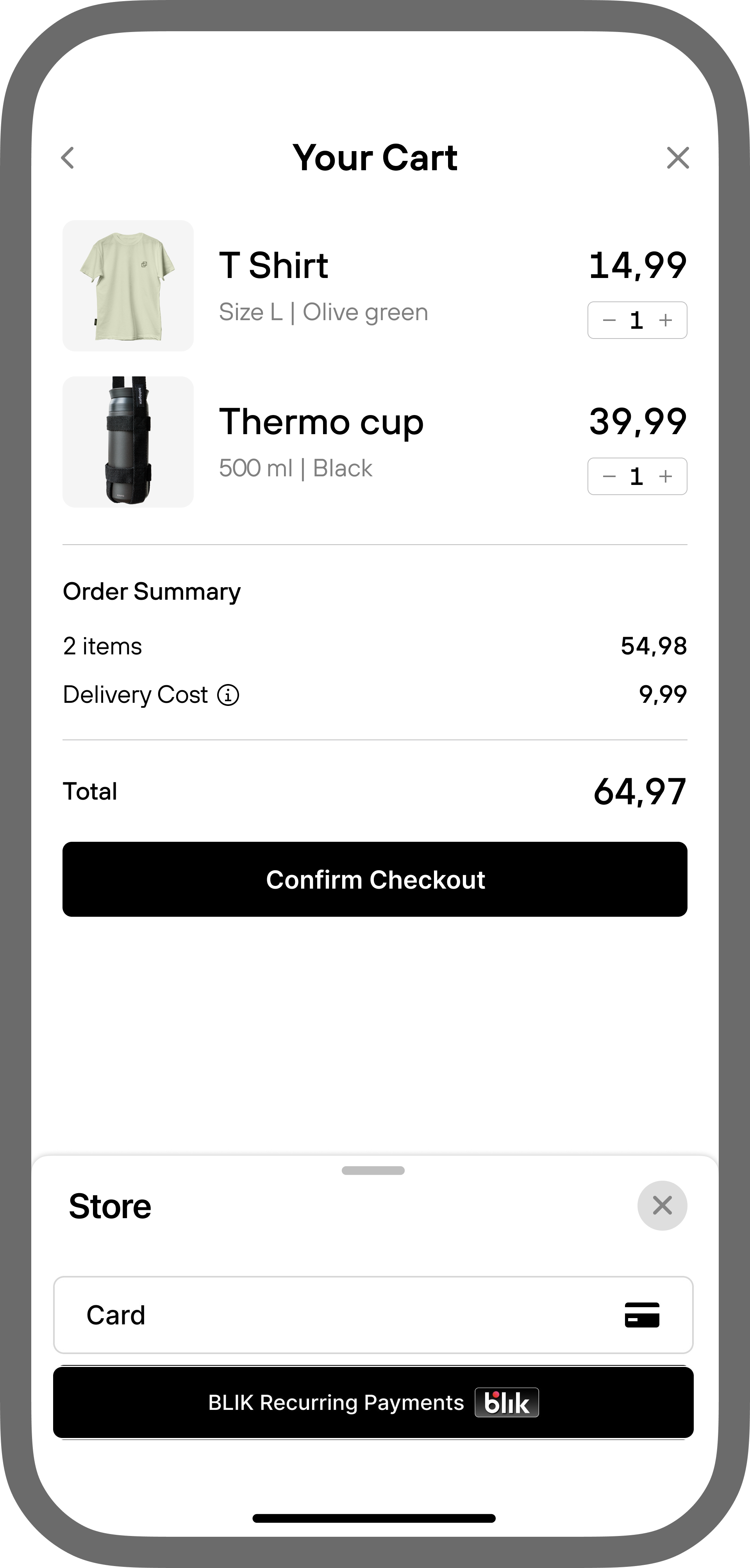
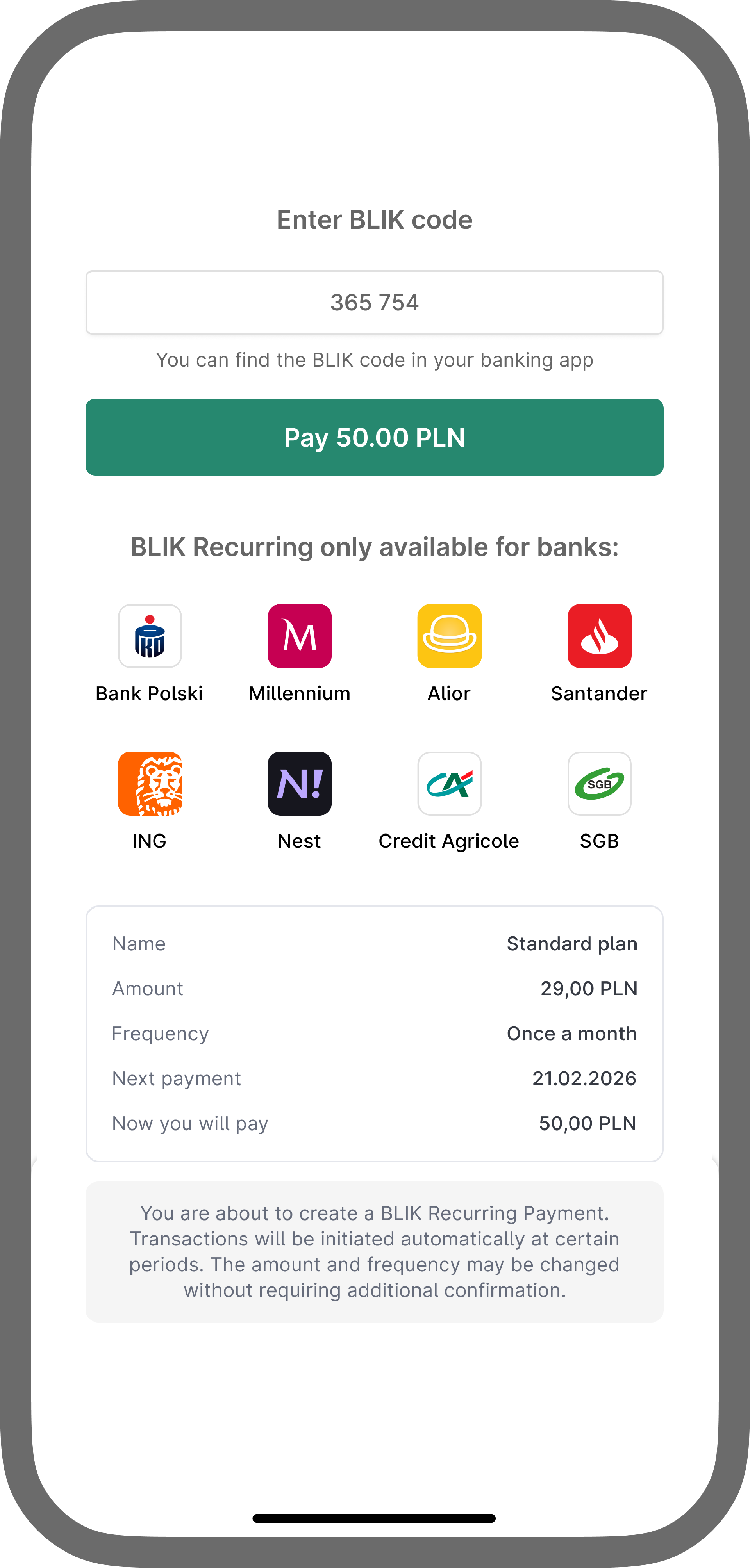

Brand requirements
These requirements apply to merchants integrating BLIK Recurring via init payment API , who build their own checkout. Merchants using the Payment Form inherit a compliant UX out of the box. BLIK applies strict UX/UI standards to merchant checkout flows via its Certification Checklist Reference . Non-compliance risks suspension of BLIK Recurring.The checkout must include the following components, in this order:
- Payment method button
- List of banks supporting BLIK Recurring
- Indicator that the payment is recurring (not one-time)
- Payment details screen
- BLIK code entry field
- Error handling for unsupported banks
- Success/failure result screens
Payment method button
Where? Payment method selection screen.- Display BLIK Recurring Payments as a separate payment method, not bundled with BLIK One-time.
- Place the BLIK logo before the method name.
- Use the exact naming below (case-sensitive).
| Locale | Method name (case-sensitive) |
|---|---|
| English | BLIK Recurring Payments |
| Polish | Płatności Powtarzalne BLIK |
Supported banks list
Where? Payment method selection screen, or an intermediate screen before BLIK code entry.Show a popup or middle screen with bank logos and names that currently support BLIK Recurring Payments. The customer must see supported banks before authorizing the payment.
Recurring indicator
When? Before the BLIK code field.The customer must clearly see that this transaction sets up a recurring payment, not a one-time charge.
Payment details screen
When? Before the BLIK code field.Even though the customer sees payment details in the banking app, the merchant checkout must display the same information before payment. Layout and field order are flexible. Only the content is mandatory.
| Field | Requirement | Example values |
|---|---|---|
| Product name | Product name + Recurring Payment name. Add where applicable: agreement number, User ID, plan name, or product/service name. Maps to order_description in the setup request. | Premium, Monthly Subscription |
| Amount | Exact amount, or clear text if variable. | X.XX PLNEN: As per agreement / As per price list / X.XX to X.XX PLNPL: Zgodnie z warunkami umowy / Zgodnie z cennikiem |
| Frequency | How often the charge occurs (quantity + time unit). Indicate variability if applicable. | Every 1 month Variable, charged per usage |
| Date of first recurring transaction | Next charge date, or explain the trigger. Optional only when no date can be specified. | Next payment: DD.MM.YYYY You will be charged upon service use |
| Amount charged at init | Amount charged when the Recurring Payment is created. If charged for verification only, state that it will be returned. | Now you will pay: 50,00 PLN Now you will pay: 0,00 PLN Now you will pay: 1,00 PLN (returnable) |
BLIK code entry field
Where? Directly above the submit button. No additional information, fields, or actions are allowed between the BLIK code field and the submit button.Field behaviour matches Certification Checklist Reference for length, mask, and validation rules.
Unsupported bank error
When? The customer enters a BLIK code from a bank that does not support BLIK Recurring Payments.Show an error screen with:
- A clear message that the bank is not supported for BLIK Recurring.
- The list of banks that support BLIK Recurring (logos + names).
- An option to retry with a different bank.
Success and failure screens
Handle success and failure screens the same way as BLIK One-time. No additional rules apply to the Recurring variant.
Subscription name
The subscription name is shown to customers during mandate confirmation. It is taken from the order_description field of the setup payment request. The first 35 characters are used as the alias label in the banking app.
Use a short, recognizable name, for example, Monthly Premium Plan. Only alphanumeric characters, spaces, and common punctuation, . : - are kept. Cyrillic characters are automatically transliterated to Latin.
Authorization ceiling
Recurring charges are processed as MIT-exempt under BLIK’s Model O scheme. BLIK’s MIT threshold is up to PLN 2,000 per transaction. Charges above this amount are declined immediately.
The setup payment follows standard BLIK One-time payment limits up to PLN 50,000 per transaction. Most issuers cap it at PLN 10,000.
Recurring token lifecycle
The token activates once the customer confirms the mandate. It becomes inactive when:
- The merchant cancels it via the revoke token API endpoint.
- The customer removes the agreement in their banking app. Solidgate receives an
ALIAS_UNREGISTERevent and marks the token inactive. - The
PAYIDAlias expires. It is set at setup for up to 10 years or indefinitely.
Solidgate notifies the merchant via notification Webhook when a token becomes inactive.
Expiry dates forPAYID Aliases cannot be extended under Model O. After expiry, a new setup flow and payment are required.
Refunds are supported via the standard Solidgate refund API endpoint. Partial refunds are supported.
Handle Blik Recurring errors
Specific errors may occur when a BLIK Recurring payment attempt fails.
-
3.02
Insufficient funds
Customer’s account has insufficient funds for the charge. -
3.03
Payment amount limit excess
Transaction amount exceeds the customer’s account limit. -
3.10
Suspected fraud
Charge was declined for security reasons. -
3.04
Transaction is declined by issuer
The customer’s bank does not support recurring payments. Returned during setup.