
Balances give you a ledger-based view of your funds, updated daily on a T+1 basis, across every legal entity, provider, and currency you process with. Every balance comes from the same financial entries and settlements you already reconcile, so the numbers in the Hub always agree with your reports.
Use balances to:
Understand your cash position
See how much has been processed but not yet paid out, per currency and per provider.
Track reserves
Know exactly how much is held in rolling reserve or security deposit, and watch it return to your balance when released.
Forecast payouts
The Current balance is the pool your next settlement is paid from.
Reconcile faster
Explain every balance change with financial entries and settlements, without waiting for the monthly report.
Balances are enabled by Solidgate for eligible merchant accounts. If the Balances page is not visible in the Hub, contact your account manager or support.How balances work
Solidgate records every financial event that affects your funds, such as a captured payment, a chargeback, a provider fee, a reserve hold, or a payout, as an immutable ledger posting. A balance is never stored or edited by hand. It is always the sum of the postings on the account.
Balances are organized into balance accounts. A balance account holds funds in one currency for one legal entity and one provider. If you process in three currencies through two providers, you see up to six balance accounts. Each balance account has two balances, Current and Reserve, and a Total.
Current
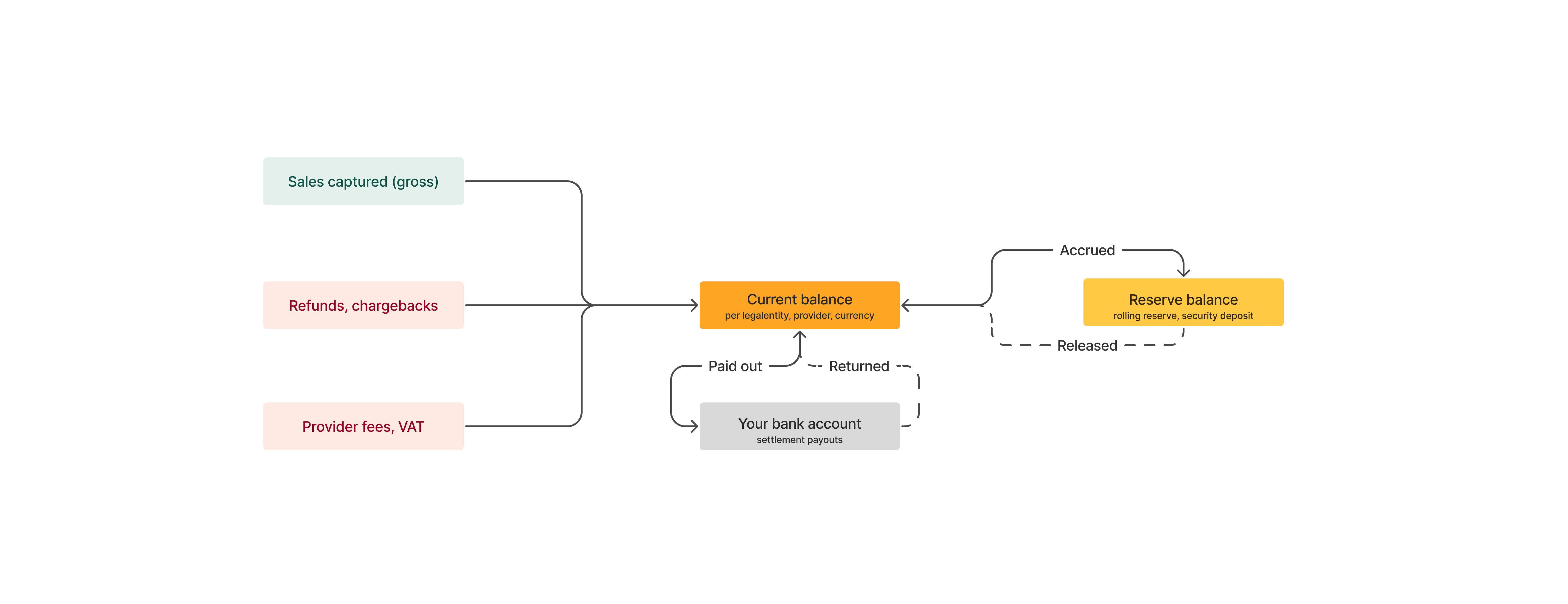
Funds that have been processed and calculated in your favor but not yet paid out. This includes gross sales, minus refunds and chargebacks, minus fees and taxes, minus amounts moved to reserve, plus reserve releases. Your settlements are paid from the Current balance according to the settlement schedule agreed with your provider.
Reserve
Funds held to cover potential liabilities associated with your payment processing, such as chargebacks, refunds, fraud, or business closure. Reserve includes both rolling reserve and fixed security deposits, as defined in your agreement. Reserved funds return to the Current balance when they are released.
Total
Current plus Reserve. Everything the provider currently holds for this balance account.
A balance can be negative. This happens, for example, when refunds, chargebacks, or fees in a period exceed sales, or when a payout was made before a chargeback was received. A negative Current balance is netted against future sales before the next settlement.
Supported providers
| Provider | Available from |
|---|---|
| Solidgate Acquiring | October 2026 |
The Available from date is the starting point for balances in the Hub, if processing was active from that time.
Balances cover Solidgate Acquiring, the acquiring provider that holds your funds. In financial entries, the provider Solidgate is the orchestration provider that carries orchestration fees, and it has no balance.
Balance changes
Funds flow between your Current balance, your Reserve balance, and your bank account. Each arrow below is one type of ledger posting.
| Event | Current | Reserve | Source record |
|---|---|---|---|
| Sale captured | + gross amount | No change | Financial entry, for example, record_type_key SALE |
| Refund | − refund amount | No change | Financial entry, for example, record_type_key REFUND |
| Chargeback or chargeback reversal | − or + disputed amount | No change | Financial entry, for example, record_type_key CHARGEBACK or CHARGEBACK_REVERSED |
| Provider fee, such as a discount, authorization, capture, refund, or chargeback fee | − fee amount | No change | Financial entry, for example, record_type_key DISCOUNT_FEE |
| Tax on fees (VAT) | − tax amount | No change | Financial entry, for example, record_type_key VAT |
| Reserve accrued (rolling reserve or security deposit) | − reserved amount | + reserved amount | Financial entry, for example, record_type_key RESERVE_ACCRUED |
| Reserve released | + released amount | − released amount | Financial entry, for example, record_type_key RESERVE_RELEASED |
| Settlement paid out |
− settlement amount
on the settlement date |
No change | Settlement |
| Settlement declined, or payout returned or rejected by the bank |
+ settlement amount
on the date of the decline or return |
No change | Settlement |
All amounts are posted in the payout currency of your pricing agreement and match the payout_amount and payout_currency fields of the corresponding financial entry. Reversals are always recorded as new postings, never as edits, so your history is fully auditable.
Example
A merchant processes in EUR with a 10% rolling reserve and a weekly settlement. Amounts are simplified.
| Date | Event | Current (EUR) | Reserve (EUR) | Total (EUR) |
|---|---|---|---|---|
| 1 Mar | Opening balance | 0.00 | 0.00 | 0.00 |
| 1 Mar | Sales captured, 1,000.00 gross | 1,000.00 | 0.00 | 1,000.00 |
| 1 Mar | Discount fee 2.5% and capture fees, −30.00 | 970.00 | 0.00 | 970.00 |
| 1 Mar | VAT on fees, −6.00 | 964.00 | 0.00 | 964.00 |
| 1 Mar | Rolling reserve 10% of gross, 100.00 moved to reserve | 864.00 | 100.00 | 964.00 |
| 3 Mar | Refund, −50.00 | 814.00 | 100.00 | 914.00 |
| 8 Mar | Settlement of 814.00 paid out | 0.00 | 100.00 | 100.00 |
| 30 Mar | Rolling reserve released after the holding period | 100.00 | 0.00 | 100.00 |
On 8 March the settlement moves the full Current balance to your bank account. Reserve is untouched until the release date defined in your agreement, when it returns to Current and becomes part of the next settlement.
Balance updates
Balances are calculated per accounting date, the same date you see in financial entries and settlement reports. The accounting day closes at 14:00 UTC.
- After 14:00 UTC, the Hub shows the previous accounting day’s closing balance.
- Before 14:00 UTC, the Hub shows the closing balance of two accounting days ago, because the previous day is not yet closed.
A financial entry always affects the balance of its own accounting date, even if it is recorded later. If you book a correction with a past accounting date, the balance is recalculated forward from that date the next time it is shown. Entries with a future accounting date, such as a reserve release scheduled for next month, are not counted until that date is reached.
Financial entries enter the Solidgate financial system about 4 hours after the transaction, and a provider may report a transaction one to two days after the customer paid. A payment you accepted today is therefore reflected in your balance on the same accounting day or within up to two accounting days.Total balance across currencies
The Total balance at the top of the Balances page sums Current and Reserve across all your balance accounts and converts them into one currency of your choice. Conversion uses today’s Open Exchange Rates. The figure is indicative and is provided for an at-a-glance view of your position. It is not the rate that is applied to your settlements. Settlement conversion follows the forex terms of your agreement.
View balances
In the Solidgate Hub , you can view every balance account with its Current, Reserve, and Total balances.
To view balances- Go to Finances > Balances.
- Select the currency for the Total balance figure: USD, EUR, GBP, UAH, or PLN.
- Filter by Legal entity or Currency, and click on Apply. Click on Clear all to reset the filters.
- Use the balance account ID when you contact support about a specific balance.
| Column | Description |
|---|---|
| ID | Unique identifier of the balance account. Quote it in support requests. |
| Currency | Currency of the balance account. Each account holds one currency. |
| Legal entity | Your legal entity under which the funds are processed. |
| Provider | The provider or acquiring entity that holds the funds, for example, Solidgate Acquiring. |
| Current | Funds processed but not yet paid out, in the account currency. |
| Reserve | Funds held in rolling reserve or security deposit, in the account currency. |
| Total | Current plus Reserve, in the account currency. |
Rows with a zero Current and zero Reserve balance remain visible so that you can confirm the account has been fully settled.